HR for small Indian businesses — salons, shops, clinics, offices
Attendance, leave and salary — worked out the way your business actually runs.
Rotating week-offs. Sandwich leave. Short leaves. A shared punch phone for staff who don’t sit at desks. You set the rules from a screen — DialHRM keeps the count, works out the salary, and shows every employee why.
No card needed. We set it up with you, in your words.

Built for our own company first. Now in daily use at two salons as well.
Why we built it
Sound familiar?
- Attendance is a register at the front desk.
- Leave balances are guesswork — settled by memory and argument.
- Salary day is a calculator, a spreadsheet and a WhatsApp group.
- And when someone asks why their salary was cut, nobody can explain it.
That was us. We run a small services company in India, and our HR ran on spreadsheets, WhatsApp messages and memory. We looked at the big HR software and it didn’t fit — so we built DialHRM for ourselves first, and then for businesses like ours.
The big HR suites
Built for companies with an HR department. Most small businesses don’t have one.
Priced for big teams
A fifteen-person team ends up paying for modules it will never open.
Rigid where you are different
Saturday–Sunday weekends and one leave policy for everyone. Your own rules become a special request.
They need someone to run them
They assume a full-time HR person. In a small business, HR is the owner and a manager who already have full days.
DialHRM is built the other way round: for small teams, for Indian rules, and set up from a screen.
What’s different
Made for the rules Indian businesses actually run on
Each of these is a setting, not custom work. Switch on what fits, leave out what doesn’t.
Week-offs that rotate
Salon and shop staff don’t all get Sunday off. Give each person their own week-off — fixed, or rotating week to week — and every one is counted.
Sandwich leave, handled fairly
Turn the sandwich rule on or off. When it applies, the employee sees exactly which day it touched and why — and chooses whether to cover it from leave or take it unpaid.
Short leave and half day, your way
Decide how many short leaves make one day of leave — three, four, whatever your rule is — separately for each kind of leave.
A punch machine that’s just a phone
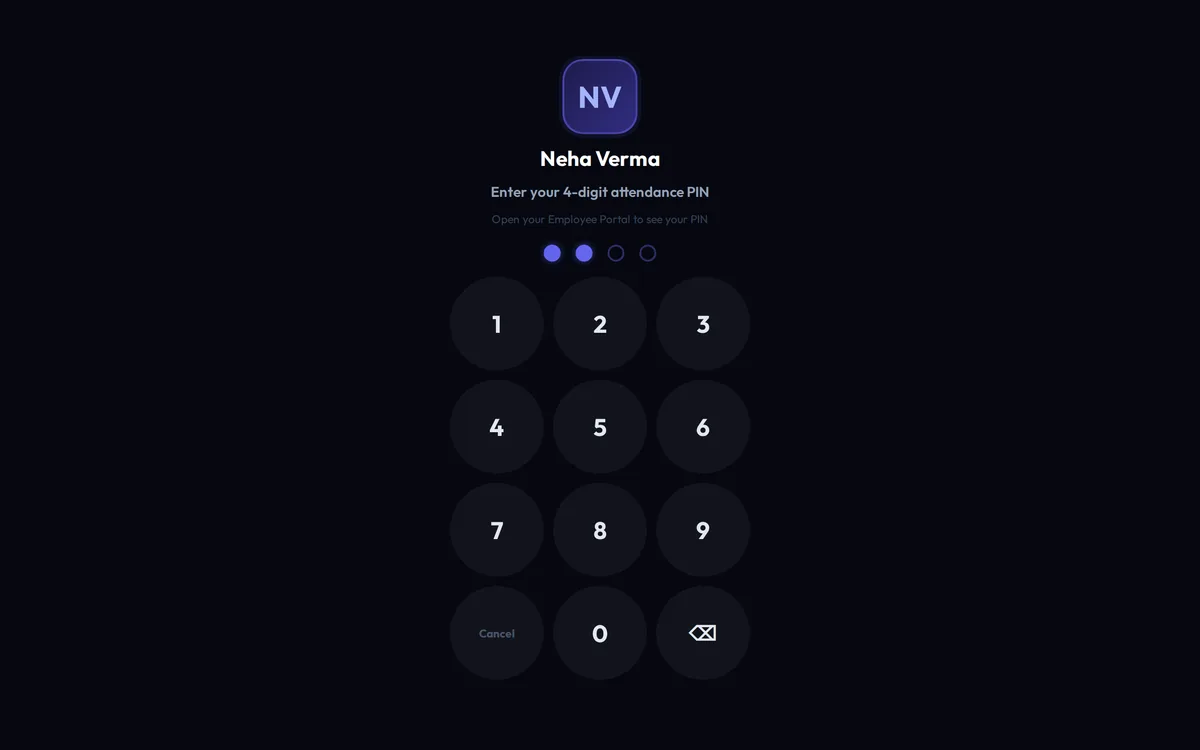
Put a tablet or a spare phone at the front desk. Staff punch in and out with their own PIN — no smartphone of their own needed.
Punch from their own phone — only at work
Staff who have a smartphone can punch from the Android app, and only when they are actually at your premises.
Menstruation leave, if you offer it
Add it as its own kind of leave, for the people you choose, once a month. It stays off unless you switch it on.
Every deduction explained
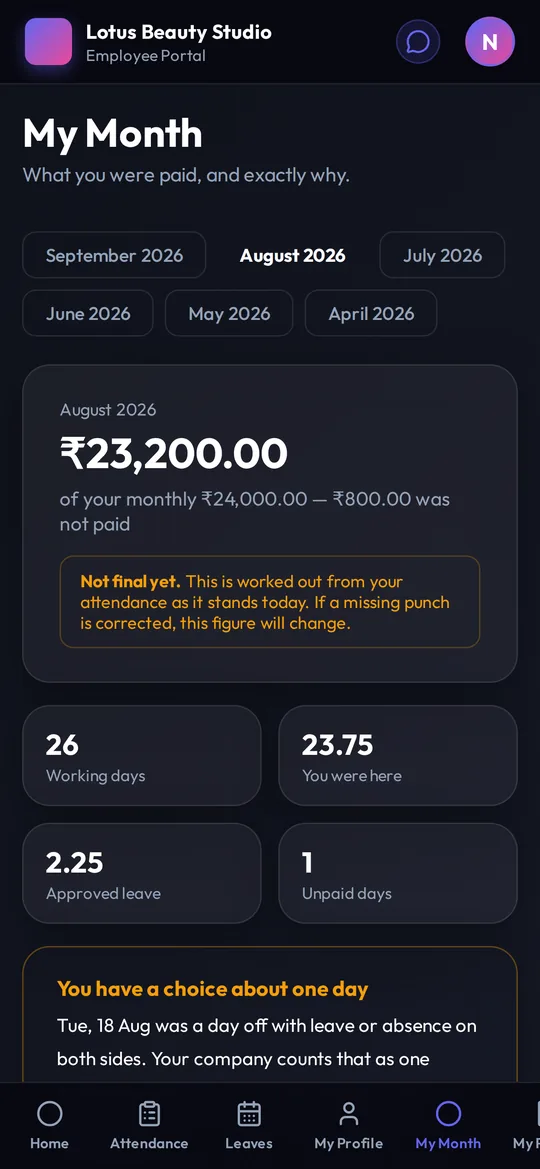
Each employee sees their own month in plain words: days worked, leave taken, and a sentence for every rupee deducted. “Why was my salary cut?” answers itself.
A payslip every month, on its own
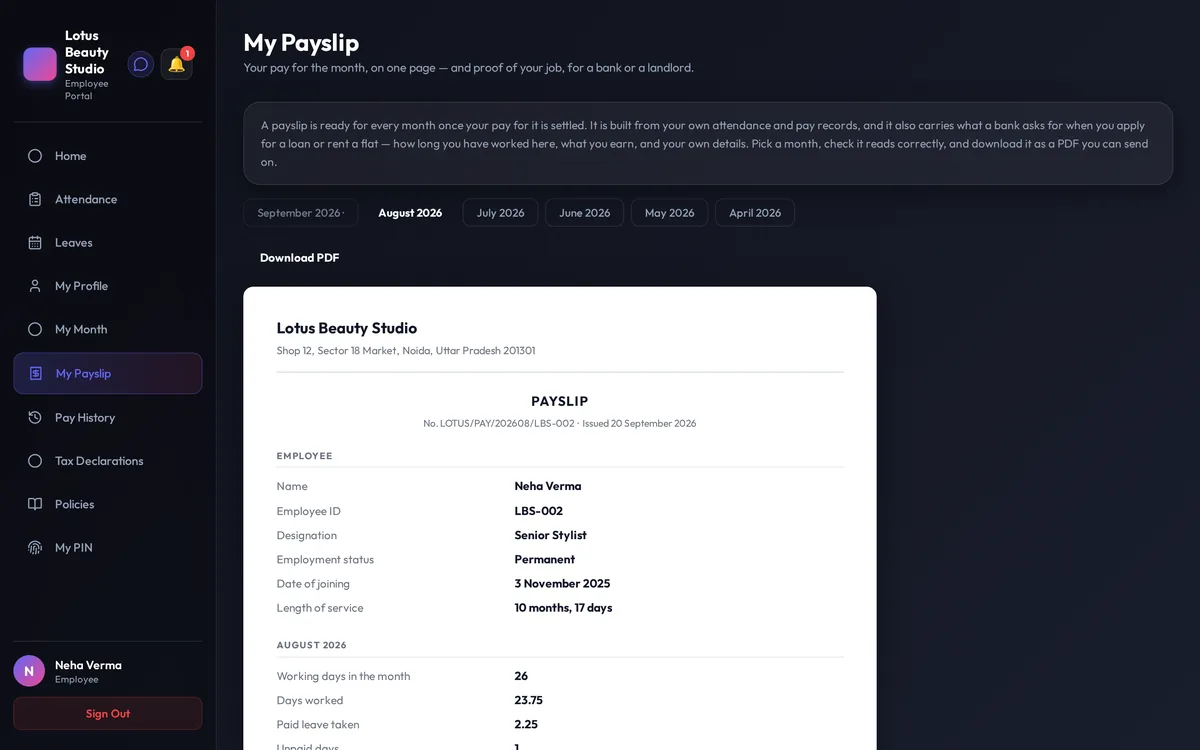
When a month is settled, every employee gets their own payslip — pay, days worked, leave balance and length of service on one page they can take to a bank or a landlord. Nobody has to issue it.
Also in the box
- Leave types you name yourself — casual, sick, earned, comp-off or anything else, each earned your way
- Forgot to punch out? The employee asks, the manager approves, and the record is put right
- Approvals that go up the line — the manager first, then the owner
- Your leave year: April to March, or January to December
- Every change recorded — who changed what, and when
See the real thing
These are the actual screens
Shown with a sample company and made-up staff. No real employee’s details are ever used here.
On their own phone
Staff see their month, their leave and their payslip in the Android app — the same screens, in their pocket.
Getting started
How the free trial works
Tell us about your business
Two minutes: your name, your number and how many people work with you.
We set it up with you
Working hours, week-offs, kinds of leave and holidays — on a call, in your own words. You don’t need to know any HR terms.
Your staff start punching
Add your people, put a phone at the front desk, and the month starts counting from the first day.
Priced by the size of your team. The trial is free and we don’t ask for card details — we talk about plans once you have seen it working.
Free trial
Start your free trial
Leave your details and we will call you to set up your company with you.
- No card details
- Set up with you on a call
- Your own rules from day one
Questions owners ask us
Do my staff need smartphones?
No. A tablet or a spare phone at the front desk works as the punch machine, and each person has their own PIN. Staff who do have a smartphone can use the Android app instead.
Can it follow our own leave rules?
Yes. Kinds of leave, how they are earned, week-offs, the sandwich rule, short leaves and half days are all settings. If your rule is unusual, tell us on the call.
What does an employee see?
Their own attendance, their leave balance, their month explained in plain words, and their payslip. Never anybody else’s salary.
Can other businesses see our data?
No. Every business on DialHRM sees only its own staff and its own records.
What does it cost?
It is priced by the size of your team. The trial is free and we don’t ask for card details — we talk about plans once you have seen it working.